
ChatGPT’s Advanced Voice Mode Now Available on the Web: How to Use It and What You Need to Know
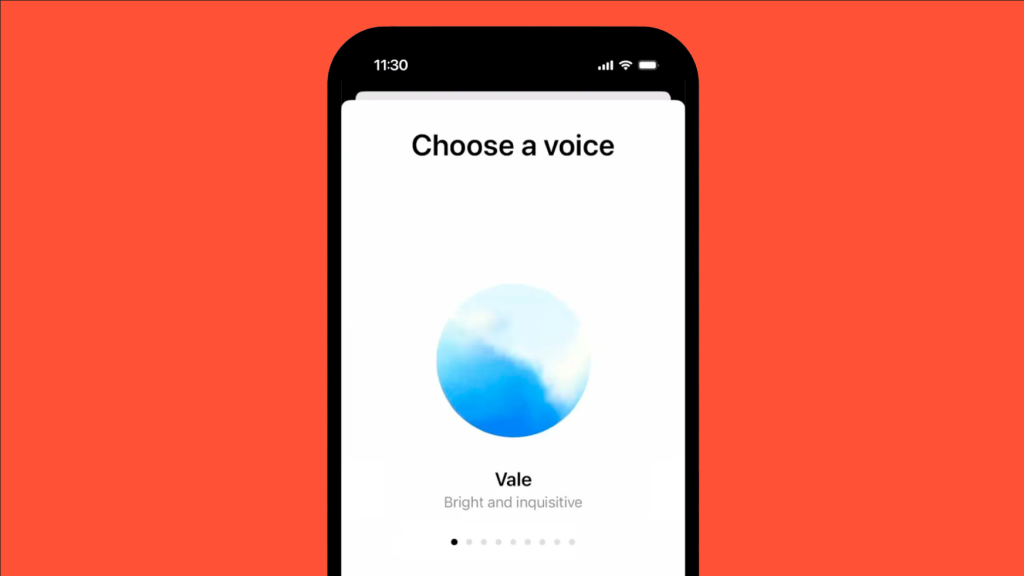
Have you ever thought, “I wish I could just talk to ChatGPT instead of typing”? OpenAI has brought ChatGPT’s new capabilities on the web, enabling you to chat with Open AI chatbot voice naturally and in real-time in any web browser. Earlier, this feature was only for mobile apps, but since September, desktop users have also been a part of it. Isn’t it exciting? The launch was announced by OpenAI’s Chief Product Officer, Kevin Weil, through a post on X. The Advanced Voice Mode is a leap forward for ChatGPT as it enables you to communicate with the bot by speaking to it instead of typing. GPT-4 voice capabilities ensure that the interaction is more seamless and realistic. ChatGPT doesn’t just understand your words—it responds in a lifelike, human voice, bringing conversations to a whole new level. This game-changing feature is exclusive to paying subscribers, including ChatGPT Plus, Enterprise, Teams, and Edu users. Let’s dive into Open AI Voice Chatbot Features Getting started with a ChatGPT voice assistant is quite simple. Here is the correct sequence of steps you should follow: Log In to Your OpenAI Account Access ChatGPT via your web browser and login using your credentials. Enable Advanced Voice Mode Look for the microphone icon in the bottom right corner of the chat interface. To enable the Chat GPT voice feature, click on it. Grant Microphone Access Your browser will request permission to access your microphone. Approve this before beginning to use the voice feature. Start to Speak You will notice a blue orb on your screen when it is activated, which means the voice chat has been initiated. You can then talk to the Voice AI assistant in a natural way, and the AI will listen to you and reply with any of the following nine voices according to their vibe. What’s all the Hype about? Imagine an AI assistant that cannot only communicate with you based on your questions but also match your tone, pace, and energy. Whether you are thinking of ideas, learning a new language, or want to chat, the Open AI voice chatbot feels intuitive, engaging, and almost alive. You can select the voices depending on the tone. For instance, Maple is cheerful and candid and works best for happy situations. Ready to see where AI is headed? The future of OpenAI is unfolding with Advanced Voice Mode, offering a glimpse into the exciting potential of AI-powered communication. You can get the free version within a few weeks, as quoted by the company. But till then, you have to be a paid subscriber of different plans like Plus, Edu, Teams, or Enterprise to access it. Checkout Stifftech for further informative blogs.
Top 5 Outsourcing Software Development Companies

When a company wants to grow, enhance its development services, or scale up its own development teams, outsourcing web development is a great option. Businesses can access a large, globally dispersed talent pool by outsourcing software development as well. Why Outsource Software Development? Outsourcing software development as part of outsourced product development can accelerate your project timeline and give you access to specialized expertise without the overhead of an in-house team. Additionally, partnering with companies that focus on outsourcing web development can further streamline your digital initiatives. Outsourcing software development offers several advantages: Access to Global Talent Outsourcing allows access to a global pool of talent. You can hire skilled professionals from different parts of the world, giving you access to diverse skill sets and expertise. Cost Savings Outsourcing to countries with lower labor costs can significantly reduce expenses. However, this includes savings on salaries, office space, benefits, and infrastructure compared to maintaining an in-house team. Focus on Core Business Activities By outsourcing non-core activities like software development, companies can focus on their core competencies and strategic goals without getting sidetracked by the technical aspects of development. Scalability and Flexibility Outsourcing offers flexibility in scaling up or down based on project requirements. You can quickly expand or reduce the team size according to the project’s needs without the complexities of hiring or layoffs. Faster Time-to-Market Leveraging an experienced outsourced team can speed up the development process. Their expertise and focus on software development can accelerate project timelines and help bring products to market more quickly. Businesses may focus all of their efforts on their core competencies, which foster corporate success, by utilising software outsourcing services. Businesses can obtain a superior product at a lower cost than they would pay if they hired in-house developers by selecting the appropriate software outsourcing service providers. Outsourcing Development Companies 1- Toptal Toptal, which has been around since 2010, is one of the most established talent marketplaces for software engineers and is the go-to destination to find excellent remote software professionals. High-Quality Talent Toptal rigorously vets its freelancers, ensuring access to a network of top-tier professionals. Their screening process involves comprehensive skills assessments and interviews, guaranteeing a pool of highly skilled developers, designers, and project managers. Flexibility and Scalability Toptal offers flexibility in hiring talent on a project-to-project basis or for long-term engagements. This scalability allows businesses to access specialized skills as needed without the commitment of traditional hiring. Matched to Specific Needs They match businesses with freelancers based on project requirements, ensuring a tailored fit for each assignment. This personalized approach helps in finding the right expertise for diverse tech stacks or project scopes. Efficiency and Speed Toptal’s platform streamlines the hiring process, enabling quick access to talent. This agility is beneficial when timelines are critical or when immediate expertise is required. Quality Assurance They maintain quality standards by continuously evaluating and monitoring the performance of their freelancers. This ensures consistent delivery of high-quality work. Customer Support and Guarantee Toptal provides dedicated support and a guarantee period. If the initially matched freelancer doesn’t meet expectations within the first two weeks, Toptal provides a replacement or refunds the engagement. 2- UPWORK Upwork is a prominent online freelancing platform that connects businesses with freelance professionals across various fields, including software development, design, writing, marketing, and more. Here’s a breakdown of what Upwork offers: Platform Overview Upwork operates as an online marketplace where businesses (clients) can post job listings or projects, and freelancers (known as Upwork “freelancers”) can bid on these opportunities. It’s a platform that facilitates the connection between clients and freelancers. Wide Range of Services Upwork covers a broad spectrum of services, including software development, graphic design, content writing, digital marketing, administrative support, and many others. Access to Global Talent Upwork boasts a vast and diverse pool of freelancers from around the world. This allows clients to find specialized skills or expertise that aligns with their project requirements. Flexibility in Hiring Clients have the flexibility to hire freelancers on an hourly basis or per project basis, depending on their needs. Furthermore, it also offers options for short-term or long-term engagements. Upwork Premium Upwork offers premium services for businesses looking for additional support, including dedicated account management, customized recruiting assistance, and access to pre-vetted talent. 3- ScienceSoft ScienceSoft creates high-quality software and promises a user satisfaction score of at least 87% for enterprise systems and a quick time-to-market for software products. The company has a track record of over 3,300 success stories across more than 30 sectors. Following established methodologies for software development and project management, ScienceSoft assists its clients in achieving up to 40% faster development times and 30% lower project costs as compared to in-house development. Project managers, business analysts, architects, and developers with expertise in big data, blockchain, IoT, AI/ML, AR/VR, and all major programming languages (.NET, Java, Python, PHP, C++, Golang, JavaScript, CSS, etc.) are among the team members of ScienceSoft. 4-Gun.io Gun.io is a platform that specializes in connecting businesses with top-tier freelance software developers. They curate a network of highly skilled developers and provide a platform where businesses can find and hire these professionals for their software development needs. It offers access to developers skilled in various programming languages, frameworks, and technologies. Businesses can find expertise in areas such as web development, mobile app development, software engineering, and more. 5- Vention A well-known outsourcing provider for software development, Vention offers a comprehensive range of specialized engineering and consulting services. Vention puts together specialized teams with knowledge of cutting-edge technologies like AI, IoT, blockchain, and AR/VR to assist organizations in growing quickly and profitably. Their products have helped businesses in the e-commerce, fintech, healthtech, and more than 30 industries. Vention’s web and mobile engineers collaborate closely with businesses of all sizes to create cutting-edge products that keep you one step ahead of the competition. Conclusion A company can feel secure in the construction and upkeep of its web presence with the aid of a software outsourcing provider. The majority of
10 Essential Web Application Security Best Practices

Web application security is crucial for protecting sensitive data, maintaining user privacy, and defending against cyber attacks. It involves implementing security measures and best practices, to ensure that the application is resistant to attacks and unauthorized access. “Making web applications safe is in the best interest of all organizations and the general economy. Providing a clearly defined set of web application security best practices will advance security professionals’ ability to anticipate and rapidly address potential threats to their enterprise.” —Yuval Ben-Itzhak, CTO and Co-Founder KaVaDo Web Application Security Best Practices Web application security best practices refer to a set of recommended guidelines. These guidelines should be followed by organizations to ensure the security of web applications from potential threats. These practices are designed to minimize the risk of security breaches, unauthorized access, data breaches, and other cyber attacks. 10 Best Practices for Web Application Security Implementing best practices for web application security is crucial. It helps to protect your application and its users from potential threats and vulnerabilities. Here are some essential best security practices for web application to consider: Secure Coding Secure coding refers to the practice of writing code with a strong focus on security. It involves adopting secure coding practices and following established guidelines to develop software. This software is resistant to various types of cyber attacks. User Authentication and Authorization The combination of user authentication and authorization ensures that users are properly identified, authenticated, and granted appropriate access rights within the web application. Security best practices for user authentication and authorization include: Input Validation and Output Encoding Input validation and output encoding work together to enhance web application security by ensuring that only valid and sanitized data is processed and presented to users. These practices are essential components of secure coding and should be applied consistently throughout the development process to mitigate security risks effectively. Secure Communication Secure communication is essential to protect sensitive data and ensure the privacy and integrity of information transmitted over networks. In the context of web applications, secure communication primarily focuses on safeguarding data exchanged. Regular Updates and Patch Management Keeping the software components of your web application up to date helps address security vulnerabilities. To implement effective patch management and regular updates: Security Testing Security testing is a critical process in the development and deployment of web applications to identify and address potential security weaknesses. It involves a systematic evaluation of the application’s security controls. This is done to ensure that it can withstand various types of attacks. Secure Configuration Secure configuration ensures that the web application and its underlying infrastructure are set up with the best security practices to protect against potential threats. Regularly reviewing and updating configurations to align with security best practices is essential to maintain a strong security posture over time. Least Privilege Principle The least privilege principle refers to the practice of granting users and processes the minimum set of permissions required to perform their specific tasks or access certain resources.By applying the least privilege principle to web applications, organizations can reduce the risk of unauthorized access, data breaches, and other security incidents. Access Control and Session Management Proper access control prevents unauthorized users from gaining access to sensitive data or performing actions they are not allowed to execute. Session management ensures that users remain authenticated while interacting with the application and that their session-related data is properly handled. Security Monitoring and Incident Response Effective security monitoring and incident response practices help organizations identify and address security incidents promptly. This monitoring approach ties closely with wider cybersecurity strategies for protecting businesses in the digital age, where detection, response, and recovery must all work together. Java Web Application security best practices Java web application security is of paramount importance to protect against potential vulnerabilities and attacks. Implementing best practices helps ensure the confidentiality, integrity, and availability of the application and its data. Here are some essential Java web application security best practices: Input Validation Validate all user inputs on the server-side to prevent common vulnerabilities like SQL injection, cross-site scripting (XSS), and command injection. Use whitelisting and input encoding to ensure only safe and expected data is processed. Protection against Cross-Site Scripting (XSS) Cross-site scripting (XSS) is a popular issue and mostly utilized in JavaScript applications. Sanitize user-generated content before rendering it in web pages to prevent XSS attacks. Use security libraries or frameworks that offer built-in XSS protection. Preventing Cross-Site Request Forgery (CSRF) Include CSRF tokens in forms and requests to mitigate CSRF attacks. This prevents unauthorized actions from being executed on behalf of authenticated users. ASP.NET web application security best practices ASP.NET is a popular web application development framework developed by Microsoft, and it offers various security features and functionalities. But still its important to monitor the activities and apply best security practices. Below are some of the best security practices: Cross-Site Scripting Cross-Site Scripting (XSS) is a common web application security vulnerability. It allows attackers to inject malicious scripts into web pages viewed by other users. It is a good practice to store authentic data in your database. Cross-Site Request Forgery Cross-Site Request Forgery (CSRF), also known as XSRF, is a web application that allows attackers to perform unauthorized actions on behalf of authenticated users. Web application security best practices OWASP OWASP (Open Web Application Security Project) is a non-profit organization focused on improving the security of web applications. They provide a comprehensive set of web application security best practices to help developers build secure applications. Here are some key web application security best practices based on the OWASP Top Ten: Injection Prevention Use parameterized queries (prepared statements) to prevent SQL injection and validate/sanitize user inputs to prevent other types of injection vulnerabilities. Authentication and Authorization Implement strong authentication mechanisms, such as multi-factor authentication (MFA), and use proper authorization controls to ensure users have access only to the resources they need. Sensitive Data Exposure If web applications don’t secure sensitive data like passwords and financial information. The attackers can get this